







Choosing silk-screen colors for custom industrial LCD cover glass is an engineering decision, not only a branding exercise. The ink must preserve the readable area of the LCD module, define non-active regions, fit the product’s visual language, and remain stable through the planned glass and assembly process. Start with the optical stack and operating environment, then turn the color choice into controlled samples and measurable acceptance criteria.

Start with the Function of Each Printed Area
Separate the design into functional areas before selecting a color. A border or black mask may conceal adhesive, sensor traces, gaskets, or the edge of the LCD active area. A logo, icon, warning mark, or legend must remain recognizable at the intended viewing distance and lighting. Treating every graphic as decoration can lead to the wrong opacity, contrast, or line weight.
Create a color map for the cover-glass drawing:
- Non-active border or mask: define its width, opacity, corner geometry, and relationship to the LCD active area.
- User-facing graphics: list each logo, symbol, scale, or label and identify whether it must be visible with the backlight on, off, or both.
- Alignment features: mark holes, windows, light guides, touch areas, and mechanical references that must remain clear.
- Cosmetic regions: specify whether a color is required for brand matching or separation.
Use Physical Color References, Not Screen Colors
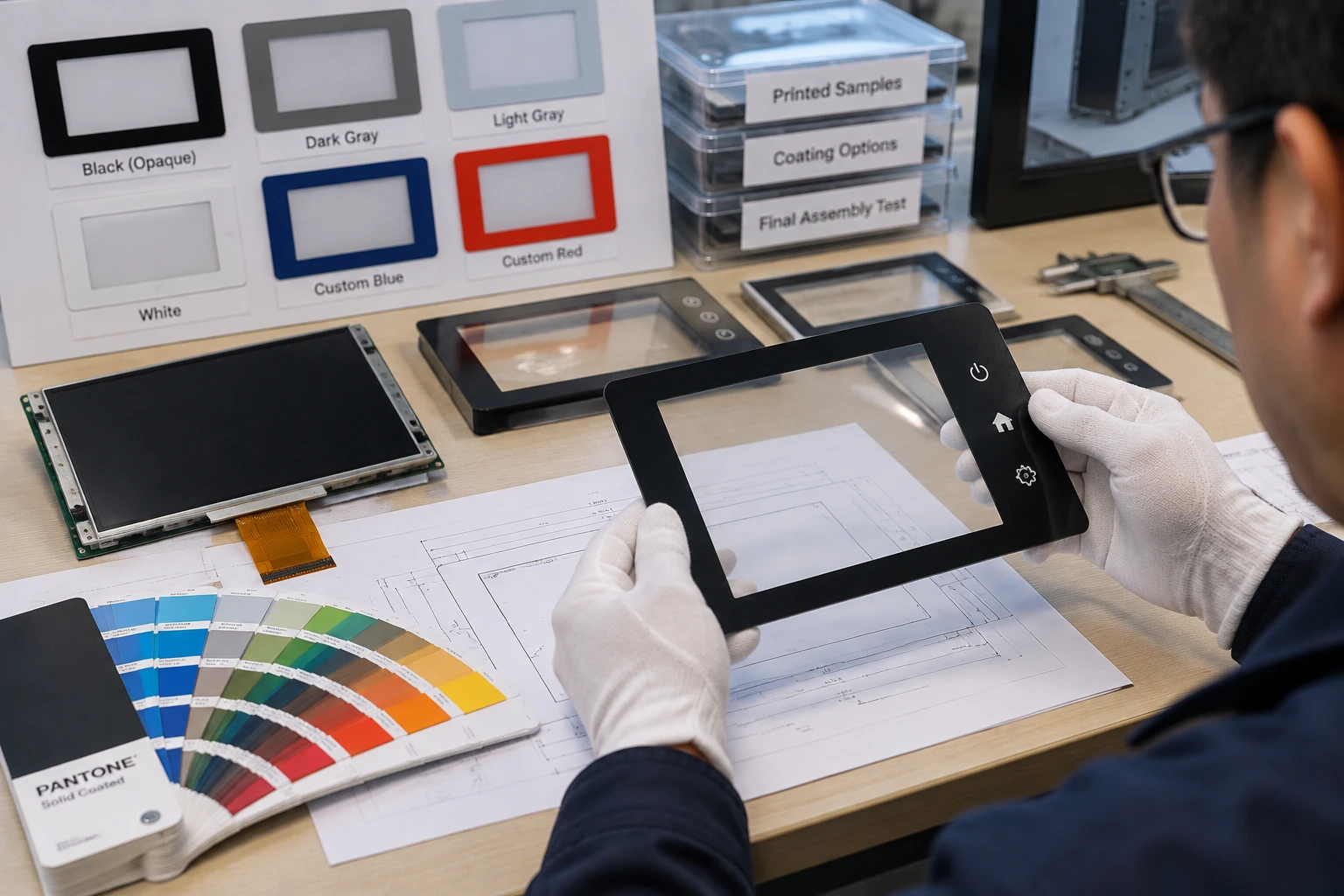
Digital RGB and HEX values are useful for early discussion but are not adequate production references. Ink is viewed through or against glass, and its appearance changes with opacity, layer order, substrate tint, surface treatment, and the light behind the LCD. Request a physical Pantone or RAL reference, then approve a printed sample on the intended glass or a controlled equivalent.
For every selected color, record:
- The reference code and acceptable visual tolerance.
- Whether the color is opaque, translucent, or backed by another ink layer.
- The approval condition, including backlight state, ambient light, viewing angle, surface side, and print order.
If a logo must match a corporate color, compare the assembled cover glass and LCD module rather than approving an ink chip in isolation. Emitted light, polarizer, adhesive, and glass tint can shift the perceived result.
Match the Palette to Contrast and Optical Performance
An industrial palette often uses a dark, high-opacity border to create a clean boundary and conceal internal layers. That is a starting point, not a universal rule. A dark print can reduce the apparent opening if it overlaps the active area, while a translucent or light color may reveal unwanted layers or reflections.
Silk-screen colors for custom industrial LCD cover glass should be reviewed with the LCD module’s optical requirements:
- Check text and icons against the LCD background across the brightness range.
- Review the design under direct room lighting, oblique light, and dominant field conditions.
- Confirm that the ink does not introduce a visible halo, uneven density, or color shift near the active area.
- Inspect the boundary between printed and clear glass for registration error and edge roughness.
Surface treatments also matter. Anti-glare or anti-reflective choices can change perceived saturation and contrast, so the color should be judged on the assembled stack. Miqidisplay’s existing AG and AR cover-glass specification guide explains why coating selection and cover-glass validation should be handled together.
Consider the Glass Substrate and Process Route
The base glass is part of the color system. Clear and low-iron substrates provide a different visual starting point from standard glass with a perceptible edge tint. Thickness, surface texture, strengthening, tempering, and bonding can change how a printed color is seen or processed. Ask which ink system and curing route fit the selected glass and downstream operations, including any thermal, humidity, cleaning, abrasion, or sunlight exposure. Do not approve a decorative coupon and assume it will survive the actual sequence.
If more than one color is needed, define the print order and registration tolerance. Each additional color can add a screen, alignment step, inspection point, or tooling consideration. A controlled two-color underlayer may be more robust than several translucent colors that depend on exact overlap. Ask how many passes are required and which dimensions control the visual result.
Balance Color Count Against Procurement Risk
Limit the palette to colors with a clear functional or brand purpose. Fewer colors can simplify registration, inspection, and change control, but reducing the palette should not remove a safety label or make an icon unreadable. For logos and decorative marks, ask whether one spot color, a backed spot color, or a process-color build is appropriate for the planned quantity and repeatability.
Your RFQ should request more than a color name. Include:
- Glass material, thickness, outline dimensions, edge treatment, and surface finish.
- Active-area opening, border width, corner radius, holes, and mounting references.
- Color standards, opacity requirements, layer order, and artwork files.
- LCD size, resolution, brightness range, viewing direction, and backlight conditions.
- Touch construction, adhesive or bonding method, and any post-print thermal process.
- Operating temperature, cleaning agents, abrasion exposure, and expected quantity.
This information helps separate color mismatch from stack-up issues and gives procurement a baseline for comparing samples.
Approve the Assembled Sample in Stages
Stage color approval so a cosmetic decision does not hide an integration problem.
1. Artwork and Drawing Review
Confirm the active-area window, mask dimensions, logo scale, datum references, layer order, viewing side, and measurement stage.
2. Printed Glass Review
Inspect color uniformity, pinholes, scratches, edge definition, registration, and coverage against the physical standard under agreed lighting.
3. Module-Level Review
Install the printed glass with the intended LCD module, touch layer, adhesive, and frame. Test representative backlight levels and viewing angles in bright and dim environments. Look for reflections, haze, visible traces, shadowing, and border color changes.
4. Environmental and Repeatability Review
Where required, expose samples to planned temperature, humidity, cleaning, and abrasion conditions, then compare multiple pieces from the same lot. Record the approved reference, cosmetic limits, and process-change requirements.
Choose a Supplier That Can Connect Color to the Display Module
The right supplier conversation is broader than “Can you print this color?” Ask for a marked-up drawing, ink and curing description, sample plan, inspection method, and responsibility split for artwork, tooling, and approval. Clarify how changes will be communicated.
Miqidisplay supplies TFT LCD modules and industrial touch panels for OEM integration. Its stated custom options include cover-glass additions, optical bonding, and adjustments to touch-panel glass thickness and shape. For a project where the printed cover glass must work with the display module and touch construction, Custom Solutions provides the appropriate starting point. Buyers can also review industrial touch-panel components when defining the complete component stack.
Conclusion
The best silk-screen color specification is a controlled engineering reference: a physical standard, defined print layer, agreed optical condition, and assembled-sample record. Match the palette to the substrate, coating, LCD module, operating environment, and process route. Keep colors purposeful, document the RFQ inputs, and approve the result only after integration.
FAQs
Can RGB or HEX Values Be Used for a Production Color Specification?
They can support early design communication, but production approval should use a physical standard and a printed sample on the intended glass or a controlled equivalent.
Should Color Be Approved Before the LCD Module Is Available?
Preliminary artwork can be reviewed early, but final color approval should use the intended LCD module, backlight, touch construction, and mechanical stack because the assembled optical result can differ from loose glass.
What Should a Buyer Send for a Technical Fit Review?
Send the display type, diagonal size, outline dimensions, active area, resolution, interface, touch requirement, brightness, viewing direction, operating temperature, mechanical constraints, quantity, drawings, and integration environment so the team can assess component compatibility, customization scope, sample requirements, and documentation needs before a quotation assessment.
Request a Technical Fit Review
If your project needs custom industrial LCD cover glass with controlled silk-screen colors, request a Miqidisplay technical fit review and send the color references, artwork, glass dimensions, active-area opening, LCD and touch requirements, optical conditions, operating environment, quantity, drawings, and integration constraints. These inputs support a customization assessment, sample planning, and documentation review before a quotation discussion.
Email: mary@miqidisplay.com
WhatsApp: +86 189 6801 5464; +44 07892800850