







Custom About Contact

IR Touch Screen

No results found

Request a Match to check frame options for your display. If filters are applied, clear the filters to reset the list.

Measure the display opening before choosing an IR frame

Compare the actual active area with the frame opening and allow clearance for the bezel and mounting depth. Confirm the host connection and test the intended installation if direct sunlight, dust or contamination could obstruct the optical grid.

IR Touch Screen FAQ

How does an IR touch screen frame detect input?

Emitters and receivers around the opening form a grid of infrared beams. The controller determines the input position when a finger or suitable object interrupts the beams.

Can I fit an IR frame to an existing display?

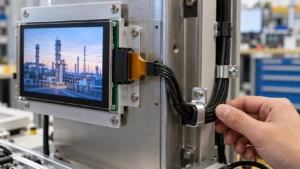
A suitable frame can add touch to a compatible display. Check the opening against the visible display area and allow room for the bezel, brackets, and cable.

How do I choose the right frame size?

Measure the width and height of the visible display area and mounting space. Compare both with the active opening and outer dimensions on the frame drawing.

Does sunlight affect an IR touch frame?

Ambient infrared light can affect some designs. Confirm the model’s ambient-light rating and test it at the intended installation angle and light exposure.

What should I send for a compatibility review?

Send the display model, opening dimensions, bezel drawing, operating system, required touch points, and estimated order quantity.

Request an IR Touch Screen Match or Quote

Include the display active area and bezel drawing, mounting depth, host operating system and connection, installation environment, and sample or production quantities.

Request a Match